
Beginner guide
How AllChinaBuy Works: Product Link to International Parcel
A fact-checked map of the public AllChinaBuy flow: product selection, domestic delivery, warehouse inspection and a separate international shipment.
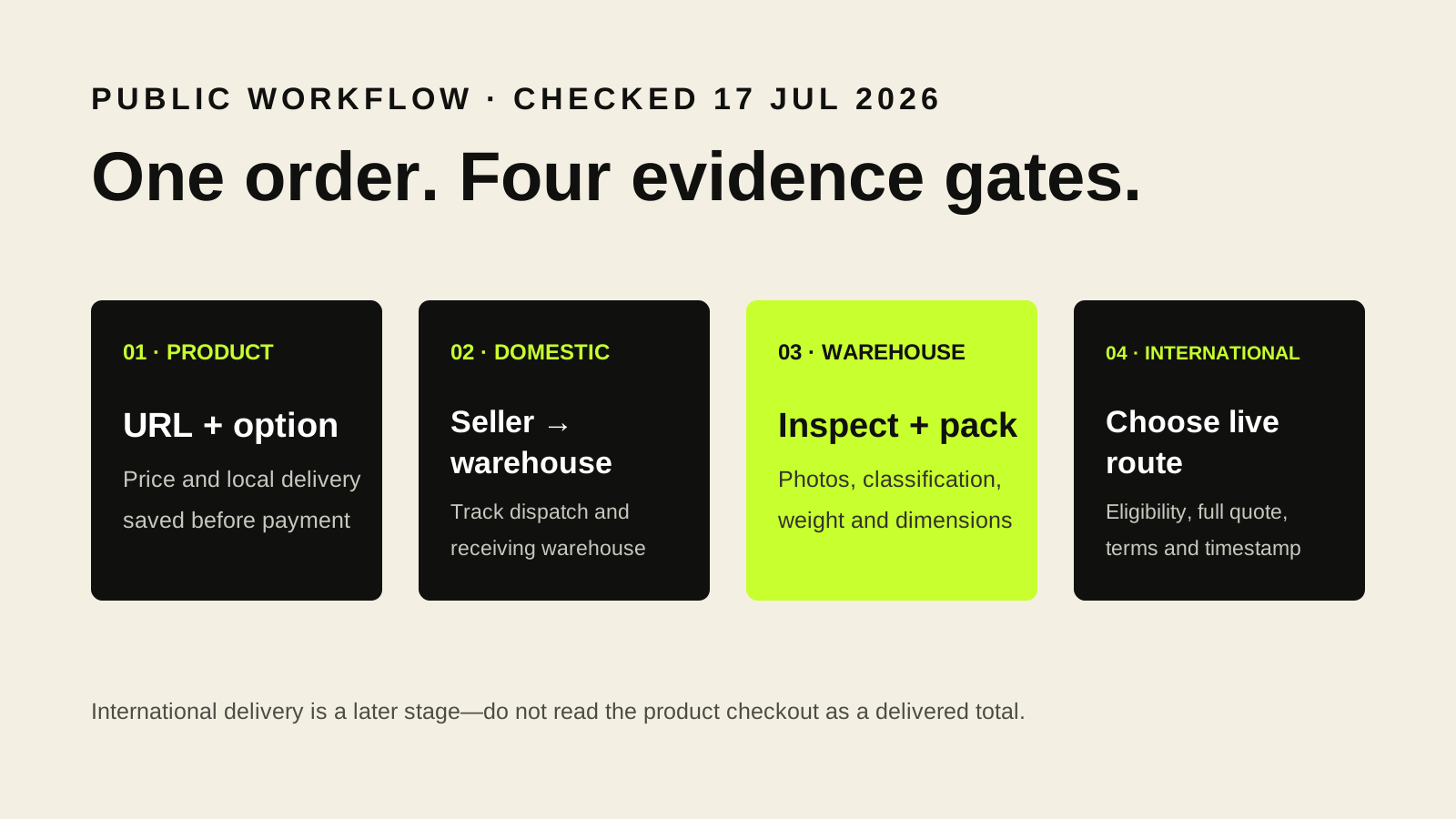
Verified on the public interface
Three facts to carry forward
- The public order page separates the item-stage total from international delivery.
- The warehouse stage can include quantity, colour and size checks plus inspection photos.
- International options depend on destination, category, warehouse, packed size and weight.
Section 01
The useful mental model is two purchases, not one checkout
An AllChinaBuy order is easier to understand when you separate the product transaction from the international parcel. The public goods page presents the item price and local delivery information, while the order-confirmation page states that international delivery is not included at that point. The item first moves from a domestic seller to a warehouse. Only after the warehouse has the item can the packed parcel be measured and an international route be selected with better information.
That separation explains why a cheap listing does not equal a cheap delivered order. Domestic delivery, optional warehouse services, packing choices, international freight, payment conversion and destination charges can appear at different moments. A reliable estimate therefore needs a running ledger rather than one copied product price. Before buying, record the listing price, domestic delivery and any selected services; leave the international line open until the packed data exists.
- Save the original product URL and selected option.
- Record item price and domestic delivery separately.
- Do not treat the item-stage total as a delivered total.
Section 02
The product page is a decision screen, not proof of the item
The public goods-detail interface exposes the familiar buying controls—options, local delivery, quantity and add-to-cart or buy-now actions—but it also contains eligibility and restriction notices. A product can become unavailable or ineligible for the service. Some categories can trigger mailing restrictions or additional terms. The practical rule is to read the live screen again immediately before payment instead of assuming a converted link will preserve the same price, stock or eligibility forever.
Preserve evidence that will still make sense at the warehouse stage: the source URL, seller title, option text, colour, size, quantity and any promised measurement. A product photograph alone is weak evidence because images can be shared across options. A short screenshot that includes the selected option and price is more useful. If a seller changes the price or the agent shows a difference to pay, compare it with this record before accepting the change.
Section 03
Domestic delivery creates the first uncertainty
The first physical movement is seller to warehouse, not China to your home. Domestic courier delays, seller dispatch times and a wrong warehouse address can affect this stage. The parcel that arrives may include the seller’s courier box, retail box, filler and labels. Those materials are relevant later because the public order page offers a choice around keeping the inbound courier packaging, and the freight calculator asks for the box size after packing.
Track seller dispatch and warehouse receipt as separate events. If several items are intended for one international parcel, also record which warehouse receives each one. The public calculator warns that products held in different warehouses cannot be shipped together. Consolidation plans should therefore be based on actual warehouse assignment, not merely on the fact that every item appears in the same account.
A consolidation plan is valid only when the items are eligible and stored in the same warehouse.
Section 04
Warehouse inspection answers a narrow set of questions
AllChinaBuy’s public order text describes standard inspection as checking quantity, colour and size and providing inspection photos. That is useful evidence, but it is not a laboratory test or a guarantee of authenticity, durability or hidden condition. Sealed products are especially important: the same interface says sealed packaging is not normally opened, checked or photographed unless an unpacking choice applies. Decide in advance whether preserving a seal or obtaining interior evidence matters more.
Review warehouse photos against the saved order, not against memory. Start with the option, count and visible labels. Then check obvious shape, colour and damage. If a missing measurement would change your decision, request a targeted detailed photo where available. Avoid vague requests such as “check quality.” A request such as “place a ruler across the insole from heel to toe and show the full scale” produces evidence that can be acted on.
Section 05
International shipping starts with measured inputs
The public freight calculator asks for destination country, product category, sending warehouse, weight and packed dimensions. These are not cosmetic filters: they can change which lines appear and how chargeable weight is calculated. The calculator also notes that its category selection is a reference and that the warehouse’s final classification prevails. That is why a route shown before purchase should be treated as a planning result, not a reservation.
Once the warehouse supplies the actual packed measurements, rerun the calculator. Compare the line’s chargeable-weight method, estimated delivery window, restrictions, delivery method and any tax-related label shown in the current interface. The calculator says delivery estimates are provided for reference and that logistics prices can fluctuate. Save the final quotation and its timestamp so a later change can be understood rather than guessed at.
Section 06
A compact order record prevents most avoidable confusion
Use one row per item with the original URL, option, price, domestic delivery, warehouse, inspection status, packed weight and a link to the photo set. Add a second section for the international parcel with dimensions, actual weight, calculated volume weight, selected line and quoted price. This makes it clear which figures are facts, which are estimates and which still need confirmation.
This guide reflects public English-language mobile pages checked on July 17, 2026. Logged-in availability, fees, routes and destination rules can differ and can change. When the live account screen conflicts with an old screenshot or a third-party post, use the current AllChinaBuy interface and ask support for clarification before paying. Our role is to explain the workflow, not to replace the platform’s current contract or your destination’s customs authority.
Primary evidence
Official pages checked
These links go to AllChinaBuy’s public mobile website. Dynamic content, logged-in prices and availability can change after our review date.
- AllChinaBuy Goods Detail ↗Public product-stage notices, service boundaries, restricted-item prompts and used-item terms.
- AllChinaBuy Order Confirmation ↗Public order-stage descriptions for inspection, detailed photos, original packing and cost timing.
- AllChinaBuy Shipping Calculator ↗Public calculator fields, chargeable-weight guidance, route notes and warehouse restrictions.